A checkout that fits your store.
Arrange billing, shipping, payment, and order-summary elements in Bricks. Style the details without losing WooCommerce's checkout logic.
Explore Checkout BuilderTHE WOOCOMMERCE TOOLKIT FOR BRICKS
Your store. Your design.
More possibilities.
Go beyond the standard storefront. Build the product pages, carts, and checkout experiences your customers deserve, right inside Bricks.
One-time payment Lifetime updates & support

ESSENTIALS / HOODIES
An easy-going essential. Pick your color, find your fit, and make it yours.
Example product. No purchase will be made.
A BETTER WAY TO BUILD STORES
Give every part of the shopping journey the same attention as your homepage. Build it visually, then let WooCommerce handle the store.
Arrange billing, shipping, payment, and order-summary elements in Bricks. Style the details without losing WooCommerce's checkout logic.
Explore Checkout Builder

Create a custom mini-cart with product details, editable quantities, and a clear next step. Carry your store's design through to the cart.
Explore Mini Cart BuilderGet an email when your size returns.
Let guests and customers subscribe to a sold-out product or an individual variation. Manage requests and queue emails when that exact item returns.
Explore Back in StockYOUR BUILDING BLOCKS
From the first product search to the final thank-you page, find the tools that fit your next build.
Build product purchase forms in Bricks.
Add a compact product purchase control.
Show coupons applied to the current cart.
Display bank-transfer payment instructions.
Collect alerts for sold-out products and sizes.
Order several products from one searchable list.
Give shoppers a direct purchase action.
Highlight popular products in your catalog.
Keep the current cart quantity in view.
Build the product list inside your cart.
Design your checkout, field by field.
Add a coupon entry form to your layout.
Help shoppers compare their product options.
Show progress toward qualifying free shipping.
Let shoppers clear the cart in one action.
Connect related products with visual choices.
Make the mini-cart part of your design.
Style navigation for customer account pages.
Draw attention to newly added products.
Customize product imagery in your templates.
Show product ratings in your store layout.
Add quantity controls for supported cart actions.
Apply volume or graduated quantity pricing.
Offer a selectable list of order quantities.
Choose variable-product options from a quick form.
Make product sale offers easier to spot.
Let shoppers check destination-based rates.
Show product availability in your design.
Clearly identify unavailable products.
Make variation choices more visual.
Bring variation swatches into product loops.
Give favorite products a place to stay.
Place WooCommerce hooks inside your layouts.
Create a custom order confirmation experience.
Add relevant offers to the checkout flow.
Create an animated menu trigger.
Organize nested navigation in an accordion.
Connect AJAX-loaded content with Bricks popups.
Help visitors search without a full page reload.
Give long pages a convenient return control.
Show a visual transformation side by side.
Present your business opening schedule.
Help visitors understand where they are.
Create structured layouts with CSS Grid.
Style Contact Form 7 forms in your layout.
Present comparable options in a clear table.
Display a countdown to a specified time.
Use two colors within a text treatment.
Build flexible image-gallery layouts.
Match Fluent Forms to your site design.
Customize Gravity Forms presentation.
Give selected heading text visual emphasis.
Display image attachment content in layouts.
Make room for menus, filters, and more.
Arrange post listings in a grid layout.
Display taxonomy terms for your content.
Style Piotnet Forms to suit your pages.
Show progress through long-form content.
Create a sliding navigation experience.
Add custom navigation to nestable sliders.
Show progress through a nestable slider.
Create a compact gallery presentation.
Add a customizable star-rating display.
Present structured information in rows.
Arrange tabular information in a grid view.
Let visitors keep a list of favorite items.
Provide an action to clear saved items.
Bring WPForms into your visual design.
Style WP Grid Builder filtering controls.
Customize WS Form styling in Bricks.
Build loops around more kinds of data.
Connect layouts to useful site data.
Control when the right content appears.
Connect your interface to store events.
No features match your search. Try another term or category.
BUILT FOR BIGGER ORDERS
Give trade customers and repeat buyers a faster route through your catalog. Bulk Add to Cart brings product search, variation rows, filters, and quantities into one builder-styleable form.
| Product | Price | Qty | Subtotal |
|---|---|---|---|
| $45.00 | 4 | $180.00 | |
| $18.00 | 6 | $108.00 |
GO BEYOND THE CORE TOOLKIT
Three dedicated plugins for the offers and options your store needs. Available separately, or together in the Ultimate Bundle.
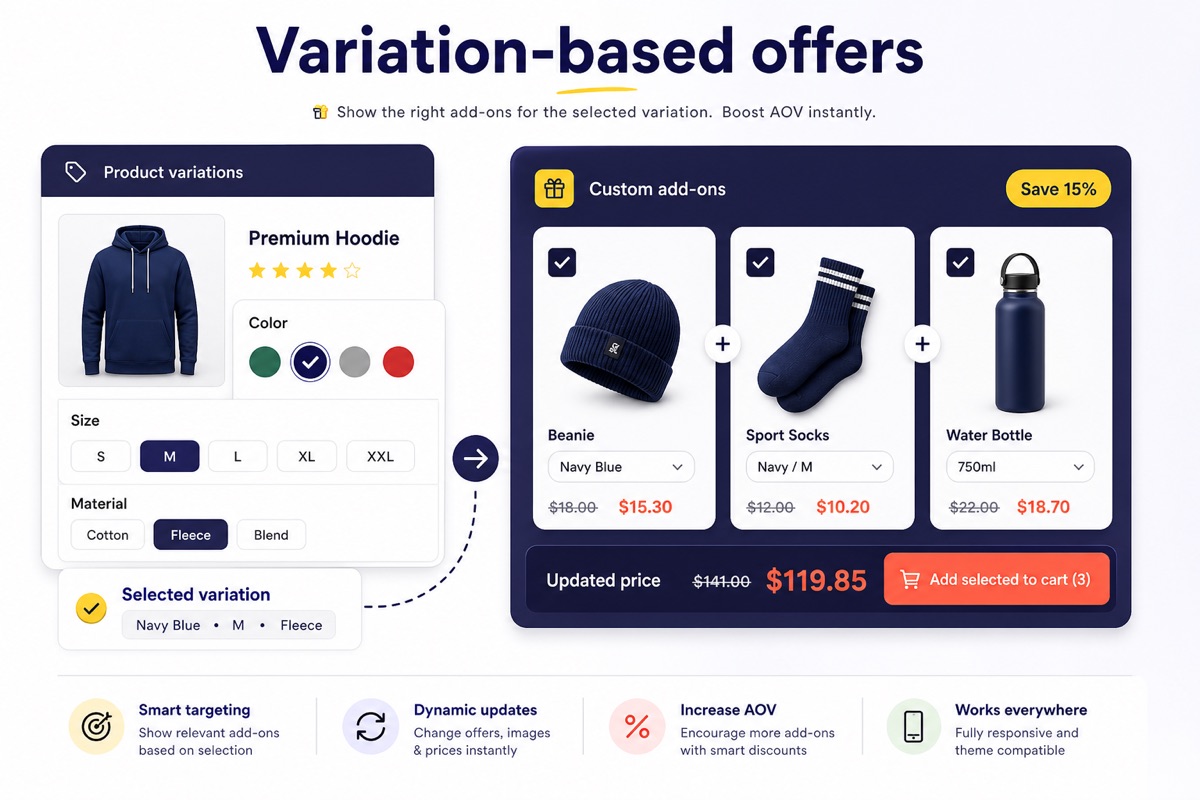
Pair the main product with the right extras. Create storewide, product-specific, and variation-based Bought Together offers with clear pricing and customer choice.
Explore Bought Together
Turn qualifying purchases into free gifts, discounted rewards, and choose-a-gift campaigns.
Explore the pluginLet shoppers personalize their purchase with additional product options before adding it to the cart.
Explore the pluginPICK YOUR NEXT BUILD
Choose a license for your own store or your next client project.
Lifetime updates and support are included in every plan.
1 website
Separate BOGO, Bought Together, and Product Add-Ons plugins not included.
10 websites
Separate BOGO, Bought Together, and Product Add-Ons plugins not included.
Unlimited websites
One purchase. The core toolkit and all three dedicated plugins.
Bricks Builder is required and sold separately. Prices shown in USD. Review the final amount at checkout.
Yes. BricksUltimate extends Bricks; it does not replace it. You also need WooCommerce for store-specific features. Check the documentation for the current WordPress, PHP, and Bricks requirements before installing.
No. The listed plans are one-time purchases with lifetime updates and support. Choose the website allowance that matches your own sites and client work.
The bundle includes BricksUltimate, Buy X Get Y Pro, Frequently Bought Together, and Product Add-Ons for unlimited websites. Single and Basic cover BricksUltimate only, not those three separate plugins.
Yes. Use your license on client projects within its website allowance. Choose Single for one website, Basic for ten, or the Ultimate Bundle for unlimited websites.
BricksUltimate elements are designed for use in the builder. Available content and styling controls vary by element. The documentation explains how each element works and where separate WooCommerce configuration is required.
Start with the documentation for setup and element guides. Explore tutorials for practical workflows, or contact support for help with your project.
YOUR NEXT STORE STARTS HERE
The flexibility of Bricks. A toolkit built around WooCommerce.
Get BricksUltimateRead the documentation