BU BricksUltimate Get the plugin

WooCommerce product options plugin

Ultimate Product Addon

A standalone plugin which is compatible with any builder.

Build clean, high-converting product customization experiences with add-on fields, swatches, conditional logic, live pricing, cart data, and order-ready customer choices.
20+Field and pricing tools
7Color swatch layouts
2Global or product setup
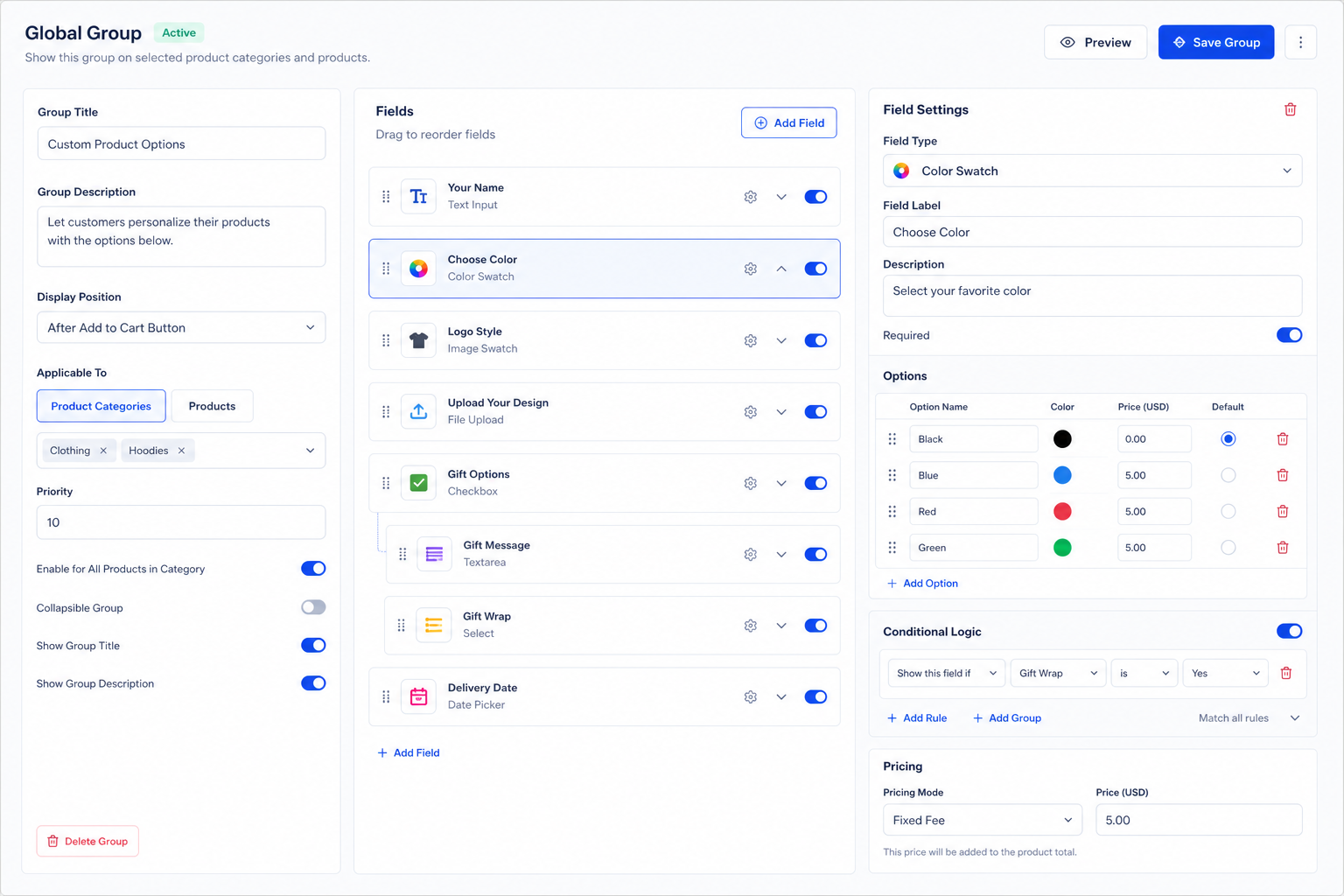
WooCommerce product page showing color swatches, add-on options, delivery date, time picker, and live total price.
Customer-friendly storefront controls Customers can choose colors, paid options, dates, times, and see the final total before checkout.
Fashion and apparel Sizes, colors, embroidery, gift wrap, and delivery slots.
Print and custom work Uploads, measurements, per-area pricing, and approval notes.
Food and local stores Toppings, extras, quantity add-ons, pickup date, and time.
Agencies and client sites Reusable groups, product targeting, and product-level overrides.

Plugin strengths

More than product fields. A complete add-on workflow.

Ultimate Product Addon is built as a standalone WooCommerce add-ons system, so your product options are managed from WordPress admin and can render inside classic WooCommerce pages or builder-made product templates.

Backend builder, frontend output

Create groups, fields, prices, options, defaults, ordering, and descriptions in the admin. Customers only see the clean frontend product choices.

Global or product-level control

Reuse add-on groups across many products or override the global setup for simple, variable, grouped, and product-specific workflows.

Pricing that matches real stores

Support fixed fees, option prices, discounts, quantity logic, character and word pricing, file fees, range pricing, and measurement / area pricing.

Visual controls customers understand

Use modern dropdowns, checkboxes, radios, color swatches, image swatches, date and time pickers, uploads, measurement fields, and live totals.

Cart, checkout, and order ready

Selected add-ons move through cart, checkout, and order item data so store admins can see exactly what the customer purchased.

Design tab for brand control

Style wrappers, labels, inputs, choices, dropdowns, swatches, measurement fields, and pricing boxes from a dedicated visual Design tab.

Agency-friendly extras

Includes multilingual compatibility, manual admin order add-ons, frontend stylesheet control, and flexible settings for client store builds.

Import, export, and backups

Move setups between sites with JSON backups, selective group exports, product-specific add-on exports, restore modes, previews, and CSV review files.

Conditional logic built in

Show or hide fields based on customer selections, option values, and match-all or match-any rules so complex products stay easy to use.

Modern swatch layouts

Offer color and image swatches with labels, descriptions, prices, defaults, premium layouts, size controls, and polished selected states.

Measurement / area pricing

Sell custom-size products with width, height, and length inputs, area or volume formulas, unit labels, and currency-aware pricing notes.

Admin order add-ons

Add or edit product add-ons inside WooCommerce orders, calculate add-on prices, attach files, and save selections into order item meta.

Separate add-on line items

Optionally show selected add-ons as a linked separate product line in cart, checkout, orders, emails, and customer account pages.

Product walkthrough

See Ultimate Product Add-Ons in action.

Watch how add-on groups, field types, and pricing options come together inside a WooCommerce store.

Builder experience

Create product add-ons without forcing customers through cluttered forms

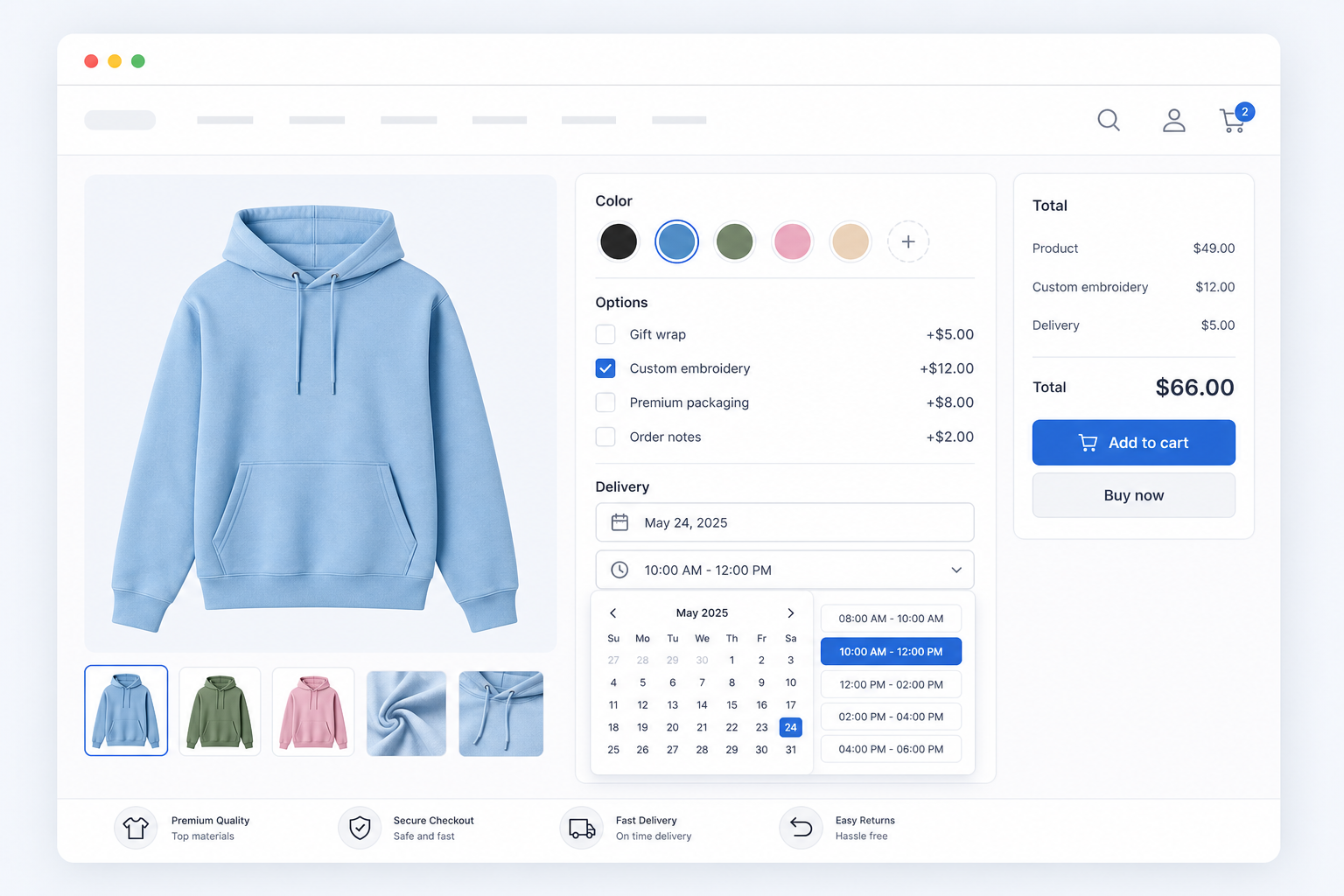
Ultimate Product Addon gives store owners a visual admin workflow for reusable add-on groups, product targeting, pricing rules, and conditional logic. Build once, reuse across categories, or create a special setup for one product.
  • Global add-on groups for many products
  • Product-level override groups for one-off products
  • Conditional logic based on selected values or filled fields
  • Live frontend totals and WooCommerce cart/order support
Admin field builder showing global group settings, field list, color swatch options, conditional logic, and pricing controls.
Visual field builder Manage field types, options, prices, defaults, swatches, rules, and targeting from one organized builder.

Field types

Share more ways for customers to personalize products

Use simple fields for quick choices, visual fields for swatches, and advanced fields when price depends on quantity, dimensions, files, or customer input.
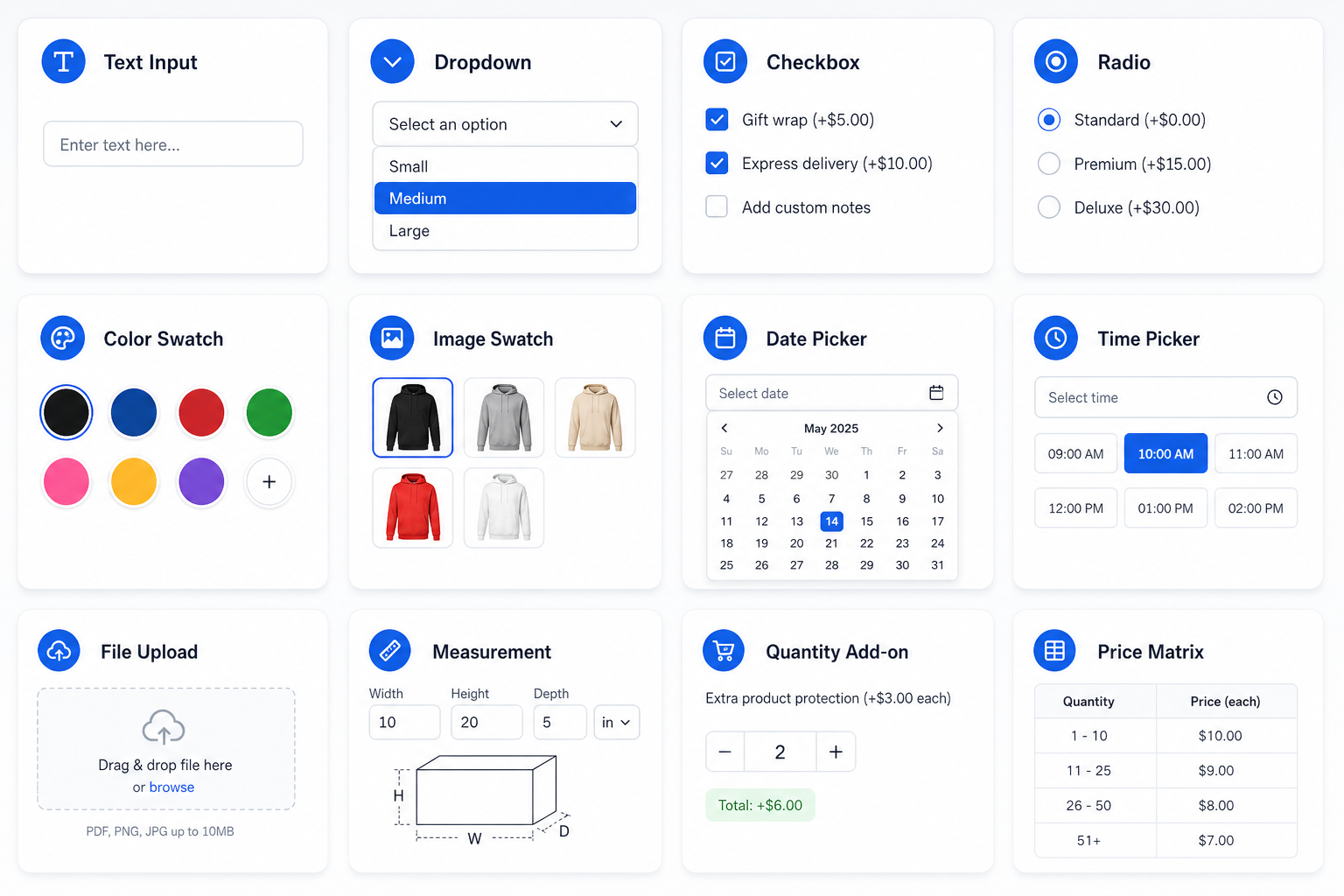
Grid preview of field types including text input, dropdown, checkbox, radio, color swatch, image swatch, date picker, time picker, file upload, measurement, quantity add-on, and price matrix.
Field type preview A visual overview of the product option controls customers can use on the product page.
01

Basic inputs

Text, validated email, phone, URL, textarea, number, checkbox, radio, select dropdown, and multi-select fields.

02

Visual selectors

Color swatches with modern layouts, image swatches, labels, descriptions, prices, and default options.

03

Booking-style fields

Date picker and time picker controls for delivery, pickup, appointments, or scheduled products.

04

Advanced pricing fields

File upload, measurement fields, product quantity add-ons, and price matrix style configurations.

Design styler

Style add-ons visually

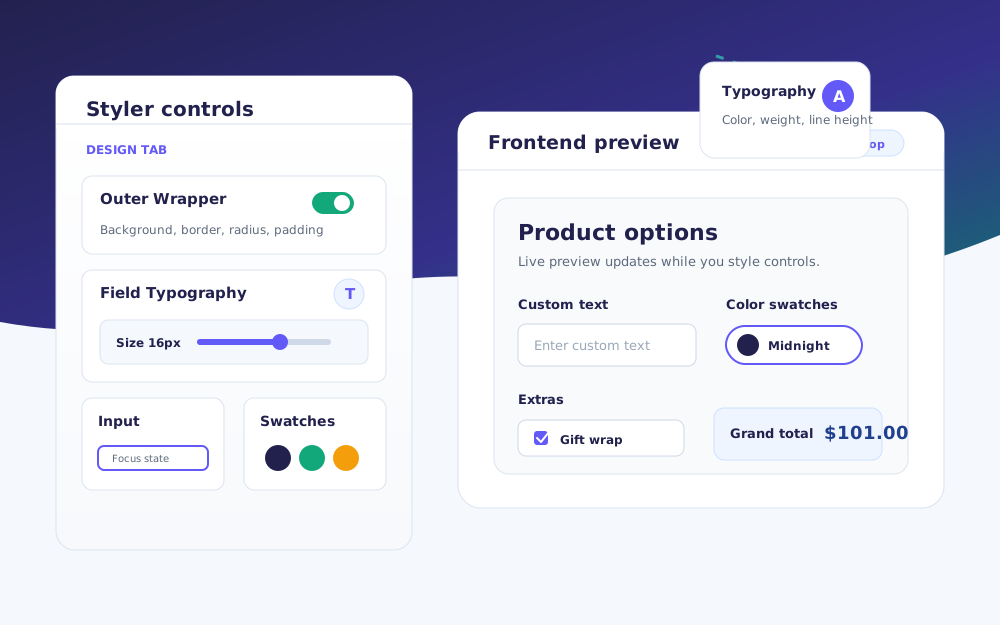
Give store owners a visual styling workflow for the add-on wrapper, groups, field labels, descriptions, inputs, choices, swatches, pricing rows, and grand total box.
  • Sticky frontend preview while scrolling long style controls
  • Typography popovers for size, weight, color, line-height, and transform
  • Slider controls for spacing, borders, radius, swatch sizing, and tick marks
  • Live preview updates for inputs, swatches, radio buttons, checkboxes, and pricing
Design Styler interface showing style controls beside a live frontend product add-ons preview.
Visual design controls Customers can tune the add-on experience from the admin Design tab and see the storefront preview update instantly.

Demo ideas

Build product flows that feel natural on the storefront

These preview blocks can be linked to real demo products on bricksultimate.com when those demo pages are ready.

Color swatch demo

Show circle dots, large circles, square swatches, color + label cards, pill style, premium cards, and minimal inline dots.

View color swatches
Gift wrap is Yes Show gift message Apply packaging fee

Conditional logic demo

Reveal follow-up fields only when customers choose the matching parent option.

View conditional logic
Product $49 Add-ons $17 Total $66

Live pricing demo

Show add-ons total and grand total as customers select paid options.

View live pricing

Pricing

Simple licensing for store owners and agencies

Choose the license that matches your store count. Every plan includes the full product add-ons toolkit.

Single store

1 Site

$39.00

One-time fee
15% discount on your next purchase

For one WooCommerce store.

  • Use on 1 website
  • All field types and pricing tools
  • Global and product-level groups
  • Updates and support during license term
Buy 1 site license
Multi-site license

10 Sites

$79.00

One-time fee
15% discount on your next purchase

For client stores and multi-site work.

  • Use on up to 10 websites
  • All field types and pricing tools
  • Global and product-level groups
  • Updates and support during license term
Buy 10 site license

Refund policy

14-day refund window

You can request a refund within 14 days of purchase if the plugin does not work as described, or if you are not receiving help from our support team.

14 days from purchase Reviewed by support PayPal fees are non-refundable

Changelog

Current release

Version 1.1.7 adds reliable cart option editing after validation errors and true one-time fees that stay fixed when product quantity changes.

Edit values preserved Required-field recovery One-time fees Quantity independent
Version 1.1.7

Reliable cart editing and one-time pricing

Customers can correct validation errors without rebuilding their configuration, while stores can charge setup and handling fees once per configured cart line.

Version 1.1.6

Variable-product targeting and settings reliability

Added variable parent products to the Global Groups selector so one assignment applies across all child variations. Also fixed the PHP 8 fatal error caused by null Global Groups input and hardened General and Design settings against the same invalid-input failure.

  • Added an optional cart item editing workflow with secure Edit options links for classic carts, mini carts, and WooCommerce Cart Blocks.
  • Added restoration for product quantity, selected variation attributes, add-on values, swatches, measurements, addresses, matrices, uploads, product selectors, and product bundles.
  • Added nonce-protected server-side validation and atomic cart item replacement so failed edits preserve the original cart item.
  • Added safe rebuilding of linked separate add-on lines and Product Bundle children after a cart item is edited.
  • Added changed-configuration handling that ignores deleted fields and options, validates against the current setup, and safely removes configurations that are no longer available.
  • Added variable parent products to the Global Groups product selector so one parent assignment automatically applies the group to all of its variations.
  • Fixed a PHP 8 fatal error when WordPress passed null to the Global Groups settings sanitizer while saving an empty or missing group collection.
  • Hardened the General and Design settings sanitizers against the same null or invalid settings input.
Version 1.1.5

Bundles, addresses, and customer consent

Build linked WooCommerce product bundles with flexible pricing and quantities, collect complete recipient addresses, and require customer acceptance for proofs, custom orders, or store policies.

  • Added a Product Bundle Add-On field for attaching real WooCommerce products and variations as linked bundle items.
  • Added checkbox, radio, select dropdown, and product card layouts for bundle selections, including product images, prices, required selection, and out-of-stock states.
  • Added bundle pricing modes for the original product price, price override, fixed discount, percentage discount, and free bundle items.
  • Added fixed, parent-synchronized, and customer-selectable bundle quantity modes with configurable stock handling.
  • Added linked bundle cart rows with custom bundle prices, parent quantity synchronization, variation support, and cart/order persistence.
  • Added an Address field with grouped recipient name, street, city, state, ZIP/postal code, and country controls.
  • Added required Address field validation and responsive frontend layouts for desktop and mobile product pages.
  • Added Address field persistence and formatted display across AJAX add-to-cart, cart, checkout, orders, and the WooCommerce admin order editor.
  • Added a required Terms / consent checkbox with translatable statement text, optional linked text, URL, and new-tab behavior.
  • Added secure server-side consent validation for standard and AJAX add-to-cart requests, with accepted consent stored in cart, checkout, and order metadata.
  • Added responsive admin and frontend styling for the Terms / consent field and automatically disabled pricing controls for acceptance fields.
  • Added WPML and Polylang registration for customer-facing consent text and linked text.
  • Added dedicated Email, Phone, and URL fields with appropriate browser keyboards, autocomplete behavior, and server-side validation.
  • Added safe Email, Phone, and URL persistence across AJAX add-to-cart, cart, checkout, orders, and manual WooCommerce admin order editing.
  • Updated the Documentation tab to include the Address, Terms / consent, Email, Phone, and URL field types.
Version 1.1.4

Import, templates, and live pricing release

  • Added a premium Import / Export tab for moving add-on groups, settings, design settings, and product-specific add-ons between sites.
  • Added full JSON backup export for global groups, product add-ons, plugin settings, and design settings.
  • Added selective export for all groups, selected global groups, one product's add-ons, settings only, and design settings only.
  • Added CSV review export for auditing groups, fields, pricing modes, conditions, and assignments in a spreadsheet.
  • Added JSON import with merge, replace, import as copy, skip duplicates, and update matching modes.
  • Added import preview with group, field, product add-on, image URL, missing target, and conflict counts.
  • Added duplicate detection for group names, field labels, and internal field IDs.
  • Added product/category assignment handling for missing local targets.
  • Added optional remote image swatch download and URL remapping through the WordPress Media Library.
  • Added restore-from-backup reporting with imported, updated, skipped, missing, and remapped item counts.
  • Added ready-made import templates for common store setups including gift wrapping, engraving, file uploads, measurement pricing, T-shirt customization, donation/tips, warranty plans, food toppings, event extras, proof approval, swatches, subscription upgrades, custom product builders, jewelry, print calculators, cake customization, product bundles, conditional logic, advanced pricing, and matrix pricing.
  • Added one-click template import into Global Groups or a selected product's Product Add-ons.
  • Improved template import UI so the product selector only appears when importing into Product Add-ons.
  • Fixed variable product live pricing so the pricing box and updated product price use the selected variation price.
  • Improved grouped product live pricing so original totals recalculate from selected child product quantities.
  • Added a General tab option to clear all plugin data on uninstall.
  • Added cleanup for plugin settings, global groups, design settings, license data, product-level add-on meta, order item add-on meta, the separate add-on carrier product etc.
Version 1.1.3

Design styler and measurement polish

  • Improved Measurement / Area Pricing fields with compact label-above inputs and unit text inside each input.
  • Fixed per-area pricing notes so measurement rates display with the active WooCommerce currency format.
  • Added automatic two-column and three-column measurement layouts based on enabled dimensions.
  • Simplified Measurement / Area Pricing Design tab controls to match the current frontend layout.
  • Reordered Design tab styler sections and moved the Save Design button to the bottom of the Styler Controls panel.
Version 1.1.2

Manual order add-ons release

Added WooCommerce admin order item add-ons, manual price calculation, Media Library file attachments, and structured order item meta for admin-created add-on selections.

Version 1.1.1

Multilingual compatibility release

  • Added WPML compatibility for customer-facing group, field, option, measurement, pricing, and frontend labels.
  • Added Polylang compatibility for the same add-on strings across store languages.
  • Added automatic string registration for global groups, product-level groups, and editable frontend labels.
  • Added translated cart item data, checkout details, and order meta output.
  • Improved translated product, variation, and category matching for global add-on assignment rules.
  • Added the bu_product_addons_translate_string developer filter for custom translation integrations.
Version 1.1.0

Measurement pricing and custom styling release

  • Added a complete Measurement / Area Pricing workflow with configurable width, height, and length dimensions.
  • Added area and volume pricing formulas based on customer-entered measurement values.
  • Added modern frontend measurement field styling with responsive dimension cards, unit badges, colored indicators, and focus states.
  • Added dedicated Design tab controls for measurement typography, cards, inputs, placeholder color, dots, and unit badges.
  • Added a sticky frontend Design preview for Measurement / Area Pricing styling.
  • Added a General setting to disable the plugin frontend stylesheet and generated Design-tab inline CSS for fully custom ACSS or brand-led designs.
  • Improved frontend CSS scoping so normal number input styling no longer overrides measurement inputs.
Version 1.0.0

Premium release foundation

Introduced global and product-level add-on groups, 20+ field and pricing tools, conditional logic, live frontend pricing, separate cart line mode, modern swatch/date/time UI, Design and License tabs, EDD activation, plugin updater support, Bricks Builder preview loading, and translation files.

Ready for configurable products?

Give WooCommerce customers clearer product choices.

Publish reusable product add-ons with visual selectors, smart rules, and pricing that is easy to understand.

Choose a license