Miscellaneous Settings(Misc TAB)
The Misc (Miscellaneous) tab in SureBricks provides a collection of additional features that enhance functionality or tweak the behavior of your site. These settings can be easily toggled ON/OFF as needed, allowing you to customize your experience without complex configurations.
Here are some typical miscellaneous settings you might find:
1. Show Admin Bar In The Editor
By default, the WordPress Admin Bar is hidden in the Bricks editor for a distraction-free experience. Enabling this option brings back the Admin Bar, allowing you to:
- Quickly navigate to the Dashboard, Pages, Posts, or Settings without exiting the editor.
- Access user profiles, comments, or updates with a single click.
- Switch between frontend and backend seamlessly while designing.
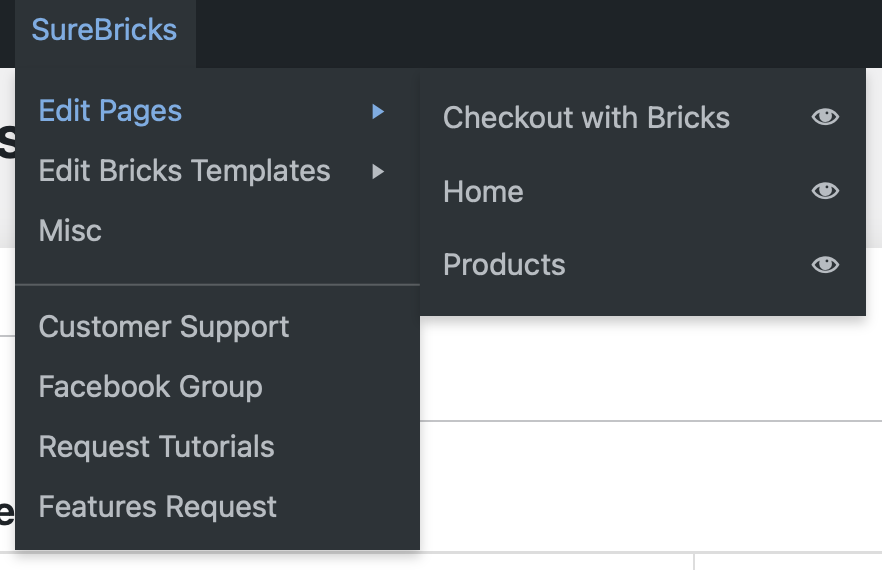
2. SureBricks Menu On Admin Bar
This feature adds a custom quick-access menu to the Admin Bar (when enabled), providing instant shortcuts to key sections:
- Open to Bricks Templates, Post, Pages directly from the editor.
- Go to Customer Support, Facebook Group, or Bricks Tutorials in one click.
- Navigate faster without switching screens—perfect for power users.
3. Interactions
SureCart provides custom JavaScript events that allow developers to hook into various moments of the checkout process. When integrated with Bricks Builder's Interactions feature, these events enable powerful, dynamic behaviors on your website in response to SureCart actions.Available SureCart Events in Bricks
Here are the 12 event listeners currently available in your Bricks integration:Cart Events
- Toggle cart - Triggered when the cart drawer opens
- Added to cart - Fires when an item is added to cart
- Removed from cart - Fires when an item is removed from cart
- Viewed cart - Triggered when cart is viewed
- Cart updated - Triggered when cart contents change (quantity updates, etc.)
Checkout Events
- Checkout initiated - When customer begins checkout process
- Checkout completed - After successful purchase completion
- Checkout updated - When moving between checkout steps
Other Events
- Order paid - When customer pays of an order
- Subscription started - When customer started their subscription
- Shipping info added - When adding the shipping methods
- Product viewed - When customer views a product details
4. Custom Query Providers
We added some custom query loop providers for the bricks query loop builder. If you need them, you should turn ON this feature here. Therefore, thes custom providers will appear on the Bricks editor for use.
5. Styler Of Native Elements
The goal is to improve the design customization options for SureCart's elements within the Bricks editor. We've upgraded the controls for 5 key elements of the SureCart. These enhancements automatically apply when you activate the SureBricks addon, giving you more design flexibility in the Bricks editor.
By refining the element controls, users can:
- Save Time – Reduce the steps needed to adjust styling, layouts, and functionality.
- Simplify Customization – Make it intuitive for users to modify the appearance (e.g., colors, typography, spacing) without manual coding.
- Streamline Workflow – Ensure all key design settings (e.g., buttons, forms, checkout sections) are easily accessible in the Bricks UI.
If you don't need them, you can disable them by toggling the switch button here.

6. Store Checkout Page
The goal is that you can create the custom checkout page with the Bricks editor and configure it as the default checkout page for your store site. You will just copy the page ID and enter here.