By default descriptions, reviews, and additional information is shown in one ‘tabs’ section on the single product page. Want to display the ‘reviews’ outside this ‘tabs’ area separately for more user engagement and visibility? You can quickly implement this with bricks builder.
Preview
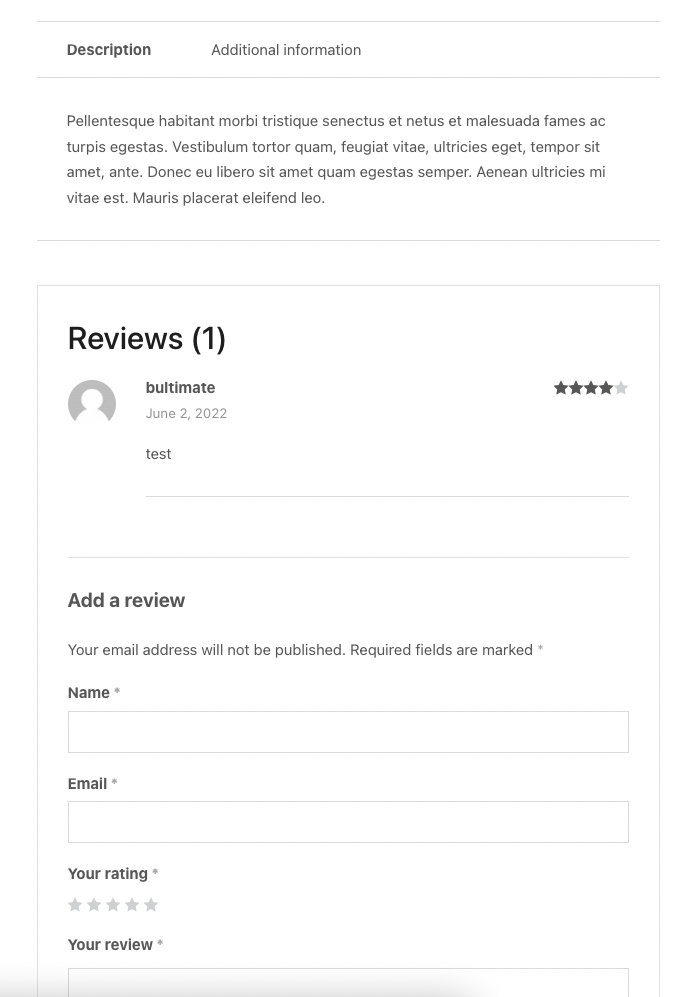
Step 1: Open the Single Product Page template on the bricks builder editor and add a Code block element at the top.[edd_restrict id=”12,14″ message=”If you want to view the rest of the content, you need to buy the BricksUltimate add-on. Users of the BricksUltimate will view this content after login.”]

Step 2: Enter the following PHP code and enable the “Execute Code” option. This code will remove the reviews tab.
<?php
/**
 * Removing Reviews tab
 */
add_filter( 'woocommerce_product_tabs', 'bu_remove_product_review_tab', 15 );
function bu_remove_product_review_tab( $tabs ) {

	if ( comments_open() ) {
		unset( $tabs['reviews'] );
	}

	return $tabs;
}
?>
Step 3: Add another Code element where you are wanting to display the product reviews and review form. Enter the following PHP code and enable the “Execute Code” option.
<?php
bu_show_product_reviews();
/**
 * Add the product reviews
 */
function bu_show_product_reviews() {
	global $product;

	if ( ! comments_open() )
		return;
?>
	<div class="product-reviews">
    <?php if( $product->get_review_count() > 0 ) : ?>
    <h2 class="review-title" itemprop="headline">
			<?php printf( __( 'Reviews (%d)', 'woocommerce' ), $product->get_review_count() ); ?>
		</h2>
    <?php endif; ?>
		<?php call_user_func( 'comments_template', 999 ); ?>
	</div>
	<div class="clearfix clear"></div>
<?php
}
?>

<style type="text/css">
.product-reviews {
	border: 1px solid #e6e6e6;
	padding: 30px;
}
.review-title {
	margin-bottom: 20px;
}
.comment-reply-title {
	border-top: 1px solid #e6e6e6;
	display: block;
	font-size: 20px;
	margin-bottom: 15px;
	padding-top: 25px;
}
</style>
Check the single product page at frontend and you can see the changes.[/edd_restrict]


