Bricks has a form element and you can make the form on your WordPress site. In this tutorial, I shall show you how you will add the custom CSS class like screen-reader-text or my-labels-class to labels.
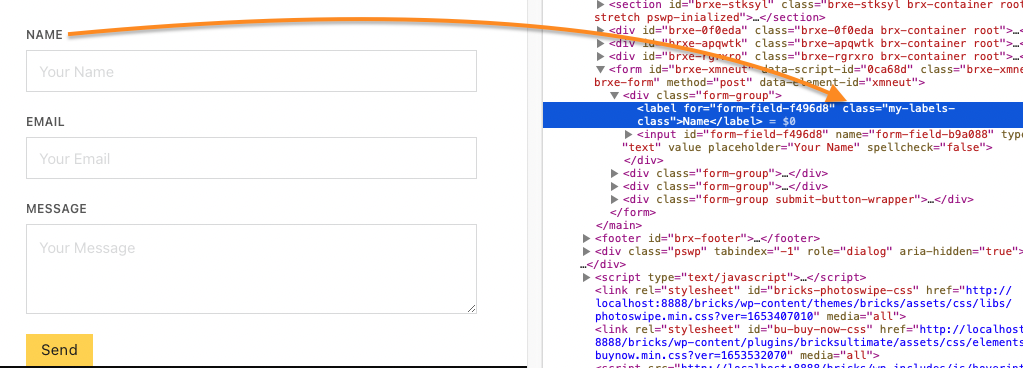
Step 1: Open the functions.php file of Bricks child theme.[edd_restrict id=”12,14″ message=”If you want to view the rest of the content, you need to buy the BricksUltimate add-on. Users of the BricksUltimate will view this content after login.”]
Step 2: Drop the following code at end of the file.
add_filter( 'bricks/element/render_attributes', 'bu_add_class_form_labels', 10, 4 );
function bu_add_class_form_labels( $attributes, $key, $settings, $element_name ) {
	if( $element_name == 'form' ) {
		foreach ( $settings['fields'] as $index => $field ) {
			if( $key == "label-{$index}") {
				$attributes[ $key ][ 'class' ][] = 'my-labels-class';
			}
		}
	}

	return $attributes;
}
If you are using the Bricks 1.5 RC or later version, you will use this code
add_filter( 'bricks/element/render_attributes', 'bu_add_class_form_labels', 10, 3 );
function bu_add_class_form_labels( $attributes, $key, $element_name ) {
	if( $element->name == 'form' ) {
		$settings = $element->settings;

		foreach ( $settings['fields'] as $index => $field ) {
			if( $key == "label-{$index}") {
				$attributes[ $key ][ 'class' ][] = 'my-labels-class';
			}
		}
	}

	return $attributes;
}
[/edd_restrict]


