Premium add-on for Bricks Builder

Frequently Bought Together

Boost WooCommerce Sales with smart product bundles

Frequently Bought Together helps store owners create high-converting add-on offers with custom product lists, automatic storewide rules, variation-based bundles, discounts, and Bricks-friendly placement.

Storewide Show automatic or manual bundle products across the shop.
Per product Create handpicked offers that override global defaults.
Variations Display specific add-ons for selected product variations.
Bricks ready Use shortcode placement inside Bricks product templates.
Built for serious WooCommerce stores

Everything you need to sell better add-ons

Create polished Amazon-style Bought Together experiences without forcing customers through confusing bundle builders or manual upsell flows.

01

Automatic storewide offers

Use related products, upsells, cross-sells, smart rules, or manually selected products as your default Bought Together list.

02

Handpicked product bundles

Add custom products from the WooCommerce product editor and drag them into the exact order you want customers to see.

03

Discounts customers understand

Show original prices, discounted prices, additional price, and total bundle price so shoppers instantly see the savings.
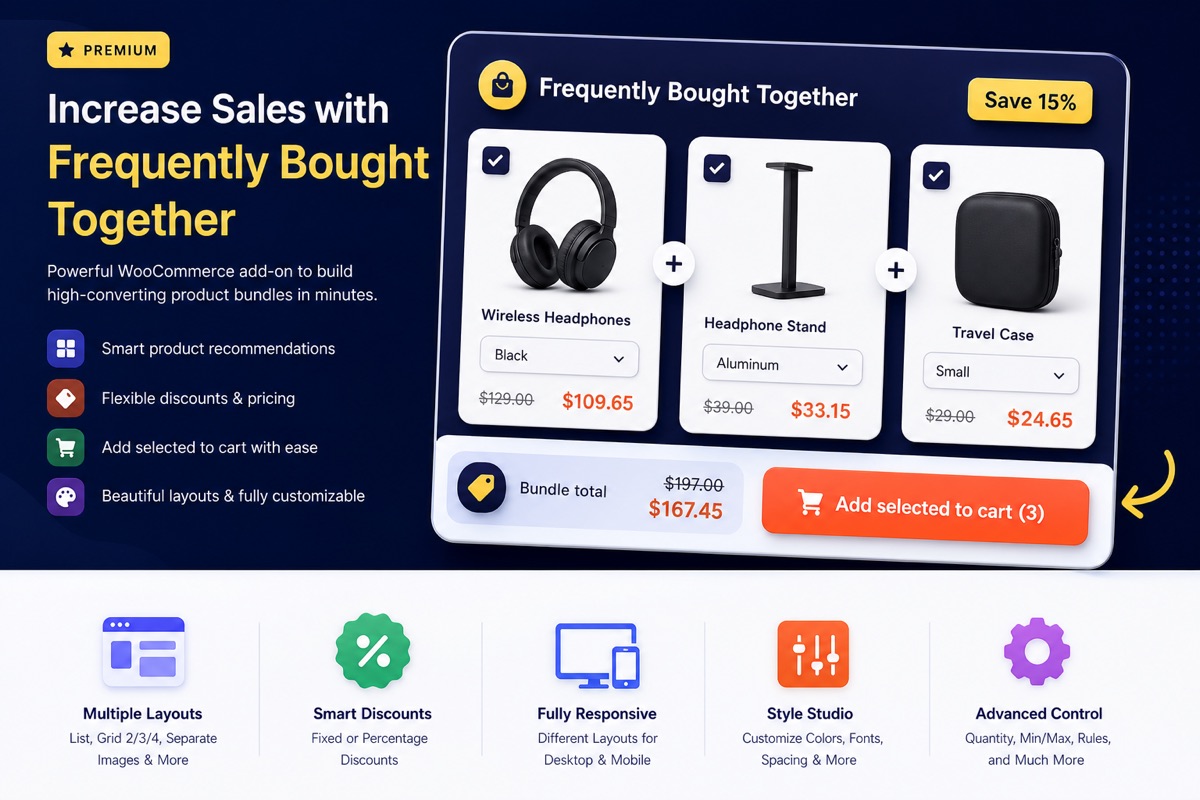
Variation specific Frequently Bought Together offer preview

Variation-specific offers that feel personal

Show different Bought Together products when customers choose a specific variation. It is ideal for apparel, accessories, kits, parts, colors, sizes, and any product where the right add-on depends on the selected option.
  • Add custom FBT products to individual variations.
  • Display variation dropdowns directly inside each add-on card.
  • Update the add-on thumbnail and price when a variation is selected.
  • Use product-level or storewide rules as the fallback.
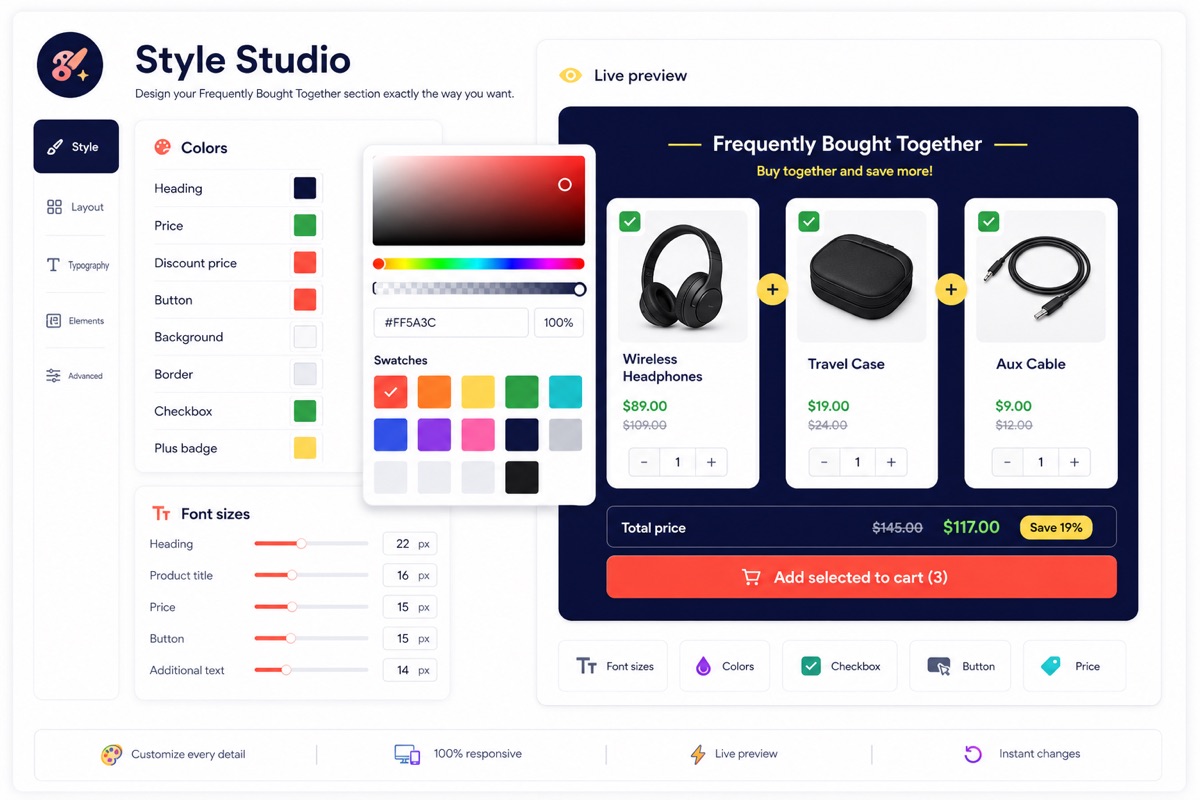
Style Studio customization controls for Frequently Bought Together widget

Design it from the Style Studio

Match the widget to your storefront without writing custom CSS. Control layout, spacing, typography, colors, buttons, checkboxes, product cards, price text, quantity fields, and summary sections from the plugin settings.

  • Separate groups for font sizes and colors.
  • Customize heading, associated text, additional price, and total price.
  • Style product titles, prices, checkboxes, variation fields, and buttons.
  • Use responsive layouts for desktop and mobile.
Simple setup

From global rules to custom offers in minutes

Start with automatic defaults, then fine-tune important products with custom bundle lists and variation-specific settings when you need more control.

Step 01

Choose your storewide sources

Select manual products, related products, upsells, cross-sells, or smart rules as the default offer source.

Step 02

Adjust product-specific lists

Use the Bought Together tab to add custom products, discounts, quantities, and checked states for individual products.

Step 03

Place it your way

Render automatically around the add-to-cart area, before or after tabs, or place it manually with the shortcode in Bricks.

Step 04

Style the full experience

Use Style Studio to tune colors, sizes, cards, buttons, quantity fields, checkboxes, and price displays.

Feature packed

A polished premium plugin, not a simple add-on list

  • List, grid 2, grid 3, grid 4, and separate image layouts.
  • Desktop and mobile layout controls.
  • Fixed and percentage discounts using one simple input.
  • Default quantities and optional customer quantity changes.
  • Min and max add-on quantity limits.
  • Fancy checkbox UI and selected item counter.
  • Same-tab, new-tab, and Quick View product link behavior.
  • Show or hide thumbnails, prices, ratings, terms, and short descriptions.
  • Add add-ons separately or attach them to the main cart item.
  • WPML and Polylang support for configurable storefront text.
  • WooCommerce HPOS compatibility.
  • License activation and premium update support.
Simple pricing

One-time payment, lifetime use

Pick the license that fits your store or agency workflow. Both plans include the complete Frequently Bought Together feature set.

Single store

1 Site License

$19one-time fee

Perfect for one WooCommerce store that needs better product page add-on offers.

  • Use on 1 site
  • All layout and discount features
  • Product and variation-specific offers
  • Style Studio customization
Choose 1 Site
Lifetime deal

Unlimited License

$147one-time fee

Perfect for builders and agencies who want lifetime access to the complete FBT feature set.

  • Unlimited sites license
  • All premium FBT features included
  • Product and variation-specific offers
  • License activation and update support
Choose LTD
Changelog

Built with the details store owners asked for

The latest release includes the core storefront, admin, design, localization, bricks elements and licensing features needed for a professional WooCommerce add-on workflow.

Version 1.1.0

On 24th June, 2026

  • Added FBT Price display type control with Additional Price, Total Price, and Total Save options.
  • Added Hide label support for Additional Price and Total Price outputs.
  • Added Total Save percentage display option.
  • Added builder preview fallback markup for FBT Price so price elements remain visible in the Bricks editor.
  • Added default child template for the FBT Builder element, including heading, products, summary prices, and button.
  • Added Storewide Products setting to disable the plugin frontend stylesheet for fully custom Bricks, theme, or ACSS v4 styling.
  • Added uninstall cleanup option to remove FBT settings, design options, license data, transients, and product or variation metadata.
  • Added guarded uninstall.php cleanup handler.
  • Updated admin documentation with clear Bricks element setup steps.
  • Updated admin setting descriptions and layout for stylesheet loading and uninstall cleanup options.
  • Updated the sales page pricing section with an LTD license column and BricksUltimate LTD user message.
Version 1.0.1

On 13th June, 2026

  • Added dedicated Bricks elements for FBT Builder, FBT Products, FBT Price, and FBT Button.
  • Added a nestable FBT Builder element with standalone form support.
  • Added Bricks element-only placement option for product templates built fully in Bricks.
  • Added FBT Button style controls for typography, background, border, shadow, size, padding, and hover states.
  • Added shared Bricks product lookup logic for FBT elements.
  • Added AJAX syncing for Bricks-based FBT product lists when parent product variations change.
  • Improved standalone variable product support for shortcode and Bricks element placement.
  • Fixed variable product add-to-cart handling when Bricks AJAX add to cart is enabled.
  • Fixed selected parent variation attributes not being passed to refreshed FBT forms.
  • Fixed FBT submit button staying disabled after a valid variation selection.
  • Updated documentation for Bricks placement and element workflows.
Version 1.0.0

Initial premium release

  • Added storewide default products from manual selections, related products, upsells, cross-sells, and smart rules.
  • Added product-level and variation-level Bought Together custom lists with drag-and-drop ordering.
  • Added responsive list, grid, and separate image layouts with Bricks-friendly shortcode placement.
  • Added discount input, original and discounted price display, total price display, and cart price handling.
  • Added Style Studio, WPML and Polylang support, EDD license activation, and premium update checks.