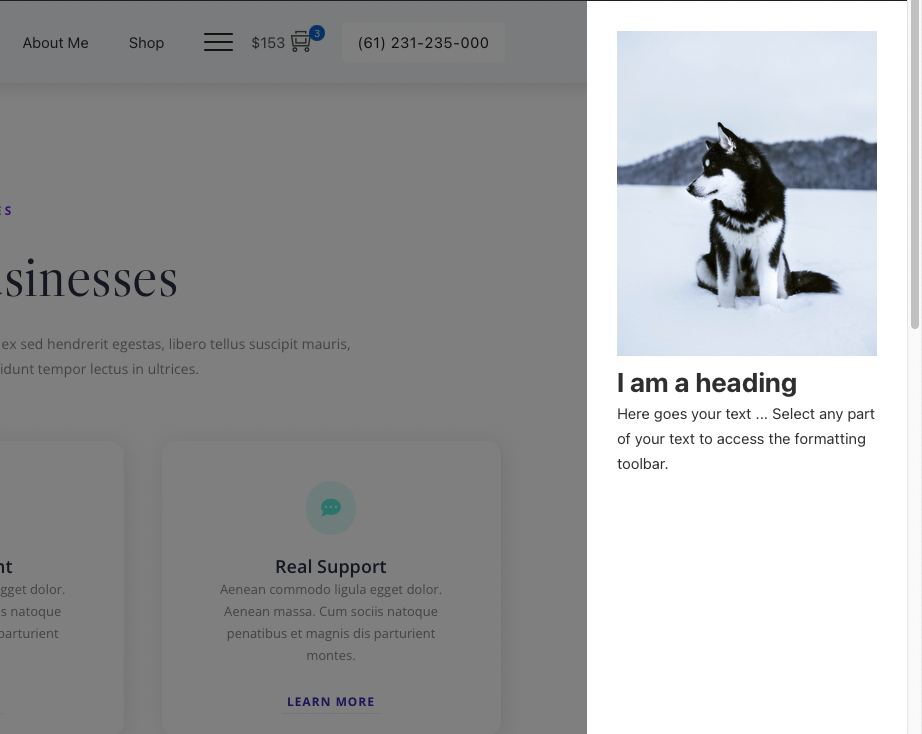
Bricks 1.6 is introducing the interaction and popup features. With these features, you can make the off-canvas panel for your site. See the video below:
[COMING SOON][edd_restrict id=”12,14,2474″ message=”If you want to view the rest of the content, you need to buy the BricksUltimate add-on. Users of the BricksUltimate will view this content after login.”]
CSS
Use the Code element and add the following CSS.
<style type="text/css">
.bricks-is-frontend .brxe-popup-5604.hide {
	opacity: 1!important;
	visibility: visible;
}
.brxe-popup-5604:not(.hide):before {
	background: rgba(0,0,0,.5);
	display: block;
	content: " ";
	height: 100vh;
	left: 0;
	position: fixed;
	top: var(--wp-admin--admin-bar--height,0);
	width: 100%;
	z-index: 10000;
}

.bricks-is-frontend .brxe-popup-5604 .brx-popup-content{
  	-webkit-transition: -webkit-transform 0.5s cubic-bezier(0.77, 0, 0.175, 1), box-shadow 0.5s cubic-bezier(0.77, 0, 0.175, 1);
    -o-transition: -o-transform 0.5s cubic-bezier(0.77, 0, 0.175, 1), box-shadow 0.5s cubic-bezier(0.77, 0, 0.175, 1);
    -moz-transition: -moz-transform 0.5s cubic-bezier(0.77, 0, 0.175, 1), box-shadow 0.5s cubic-bezier(0.77, 0, 0.175, 1);
    transition: transform 0.5s cubic-bezier(0.77, 0, 0.175, 1), box-shadow 0.5s cubic-bezier(0.77, 0, 0.175, 1);
  	z-index: 10000;
}

.bricks-is-frontend .brxe-popup-5604.hide .brx-popup-content {
	-webkit-transform: translate(130%, 0);
	-o-transform: translate(130%, 0);
	-moz-transform: translate(130%, 0);
	transform: translate(130%, 0);
}

.bricks-is-frontend .brxe-popup-5604:not(.hide) .brx-popup-content {
	-webkit-transform: none;
	-o-transform: none;
	-moz-transform: none;
	transform: none;
}
</style>
5604 is my popup template ID. You should change it with yours.[/edd_restrict]


1 comment
whoiscall
Cheers
Comments are closed.